Simulated Scenario Testing
Most organizations don’t know how their team or systems will actually respond to a serious disruption until it happens. Simulated scenario testing changes that. We create controlled, realistic incidents so you can find the gaps while the cost of finding them is still low.
LET'S CONNECT
Have a question or need help? Drop us a note below and we'll be in touch soon.
"*" indicates required fields
CONTROLLED SCENARIOS
What Is Simulated Scenario Testing?
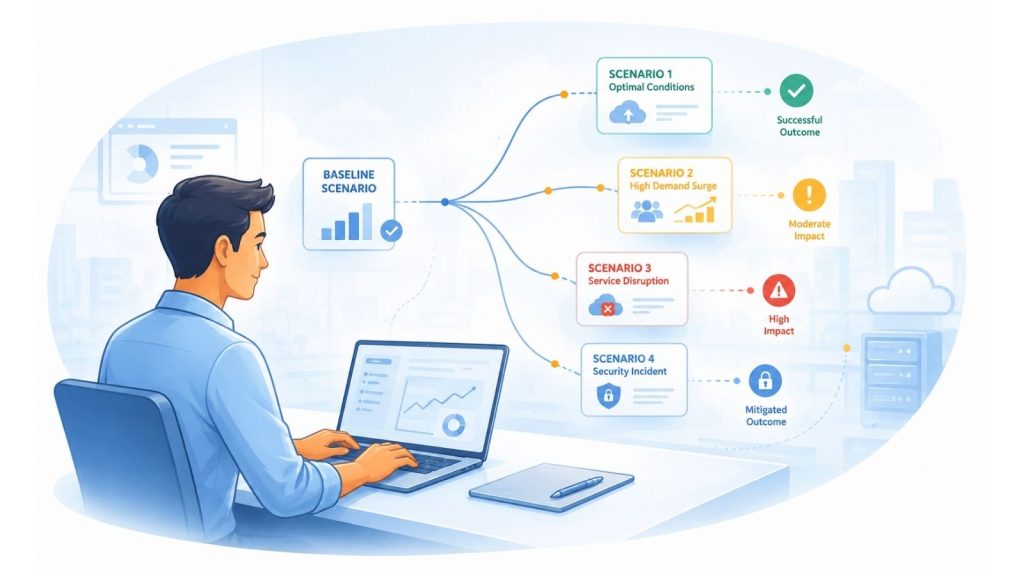
Simulated scenario testing is a controlled exercise where we recreate realistic business disruptions to see how your team and systems actually respond. Nothing touches your live environment. No real incident occurs. But the pressure, the decisions, and the gaps that surface are real.
Think of it as a fire drill for your IT and operations. A fire drill doesn’t wait for a real fire to find out whether your team knows what to do. Simulated scenario testing applies the same logic to ransomware attacks, system outages, data loss events, and communication failures.
The goal isn’t to grade your team. It’s to give you an honest, firsthand look at where your response holds up and where it doesn’t, while the cost of finding out is still low.
WHAT'S INCLUDED
From Scenario Design to Actionable Improvements
We handle everything from building the right scenarios for your environment to delivering clear, prioritized improvements your team can act on.
Team & System Readiness
LET'S START WITH A COMPLIMENTARY IT CONSULTATION
Let’s have a clear conversation about your IT, your questions, and what support would actually help.
WHY SIMULATED SCENARIO TESTING MATTERS
The Problem With Finding Out During a Real Event
When a real incident hits, your team is under pressure, your systems are behaving unexpectedly, and everyone is looking for answers at the same time. That’s the worst possible moment to discover that your backup procedures haven’t been tested, your communication chain has a gap, or your recovery steps don’t match your actual environment.
The hard truth is that most incident response plans look reasonable on paper and fall apart under real conditions. Steps get skipped. Responsibilities aren’t clear. Systems that were supposed to fail over don’t. People escalate to contacts who are no longer in the right roles. These aren’t failures of effort. They’re failures of testing.
Simulated scenario testing exists to surface those failures before they become actual incidents. It’s not about blame or grading your team. It’s about getting an honest look at where you stand so you can improve, document it properly, and go into the next real event with real confidence.
Plans that aren't tested aren't plans
An incident response plan that has never been exercised is a document, not a capability. The gap between the two only becomes visible under pressure.
Human behavior is unpredictable under stress
Even well-trained teams freeze, miscommunicate, or make unexpected decisions during real incidents. Simulations create a safe environment to understand how your team actually responds, not how they intend to.
Technology assumptions drift over time
Systems get updated, configurations change, and new tools get added. A recovery procedure that worked two years ago may not reflect how your environment actually looks today.
HOW IT WORKS
A Clear Process From First Conversation to Final Report
We handle the design, coordination, and execution so your team can focus on participating, not planning.
Discovery & Scoping
We start by learning how your environment actually works: your systems, your team structure, your existing response plans, and where you feel least confident. This shapes everything that comes after.
Scenario Design
We build realistic disruption scenarios tailored to your environment. These aren't generic templates. They're designed around the specific risks and gaps most relevant to your business.
Controlled Simulation
We run the exercise with your team in real time. Your people respond the way they normally would. Nothing touches your live systems. We observe, document, and track everything as it unfolds.
Debrief & Action Plan
Once the simulation wraps, we walk through what we saw together: what held up, what didn't, and where the gaps are. You leave with a clear, prioritized report and a practical roadmap your team can act on right away.
WHAT WE TEST
Scenarios Built Around Real Business Risks
We don't run generic drills. Every scenario is designed around the kinds of disruptions that actually affect businesses like yours.
Ransomware & Cyberattack
What happens when someone clicks the wrong link and your systems start locking up? We simulate the pressure of a real attack to test your response.
System Outage & Data Loss
Servers go down. Files disappear. The question is whether your team can get things back up and running without losing hours or days of productivity.
Communication Breakdown
During a real incident, communication usually falls apart first. We test whether your team knows how to stay coordinated when the normal tools aren’t working.
Business Continuity & Recovery
Can your business keep running through a serious disruption, or do operations stop? We test how well your continuity plan holds up against real conditions.
IS YOUR TEAM READY FOR THE REAL THING?
Most businesses don't find out where their gaps are until something actually goes wrong. Let's find them first.
Local Simulated Scenario Testing Across Central Indiana