Virtualization Setup & Maintenance For Central Indiana Businesses
Aging servers, unplanned downtime, and hardware that can’t keep up shouldn’t slow your business down. Tech365 designs, deploys, and maintains virtual environments that keep Central Indiana businesses running lean, secure, and ready to grow.
LET'S CONNECT
Have a question or need help? Drop us a note below and we'll be in touch soon.
"*" indicates required fields
THE SHORT VERSION
What Is Virtualization Setup & Maintenance?
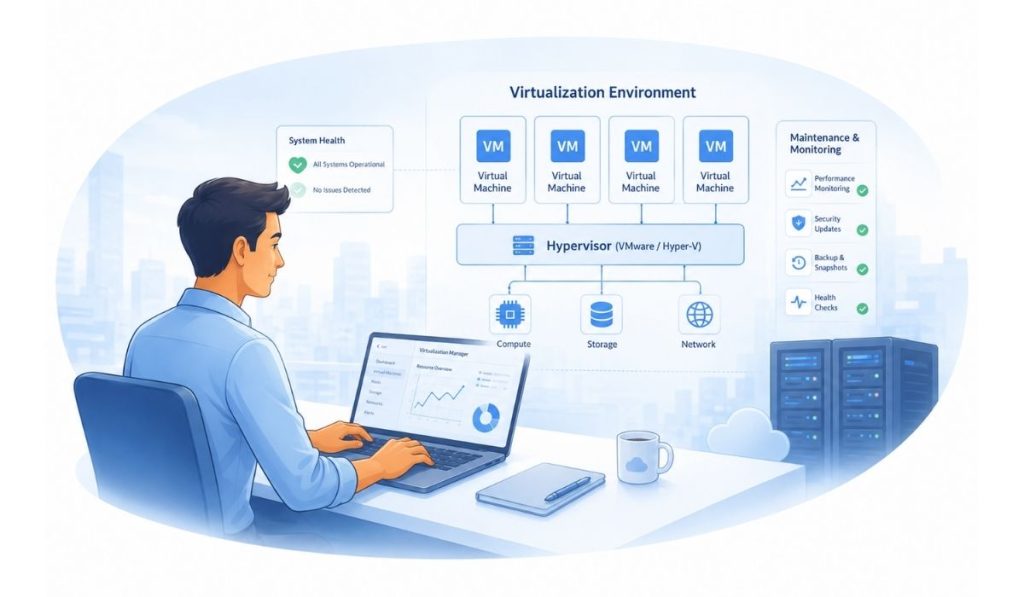
Think of virtualization like splitting one powerful computer into several separate ones, each running its own programs, without buying separate machines for each. That means your business can do more without adding more hardware.
Setup means Tech365 plans it out, gets the right software in place, and moves your current systems over safely, with little to no disruption to your day to day work. Maintenance means we keep everything running smoothly after that: watching for problems, keeping things updated, checking that backups actually work, and adjusting things as your business grows.
The result is simple: fewer physical servers to buy and maintain, faster recovery if something breaks, and a setup that can grow with your business instead of holding it back.
VIRTUALIZATION SETUP & MAINTENANCE
Do More With Less Hardware
Every server you run costs money whether it's earning its keep or not. Virtualization lets you consolidate, scale, and manage your IT environment on your terms so your business stays lean and ready for what's next.
FLEXIBLE INFRASTRUCTURE DESIGN
LET'S START WITH A COMPLIMENTARY IT CONSULTATION
No pressure, no obligation, just a clear look at how virtualization could work for your business.
WHY VIRTUALIZATION MATTERS
Protect Your Uptime and Your Budget
Virtualization isn't just a technical upgrade. It changes how your business runs day to day, from what you spend on hardware to how fast you bounce back when something goes wrong.
Lower Costs, Less Waste
Fewer physical servers means less spent on hardware, power, and space, so your IT budget goes toward growth instead of upkeep.
Faster Recovery When Things Go Wrong
Virtual environments make it easier to back up, restore, and get back to work quickly, cutting downtime from hours to minutes.
Room to Grow Without the Overhaul
Add new systems or scale existing ones without ripping out hardware or starting from scratch.
Simpler Management, Fewer Surprises
One platform to monitor and maintain means fewer moving parts and fewer things slipping through the cracks.
WHAT WE DO
Setup & Support That Work Together
Getting virtualization right takes more than a one time install. Tech365 handles the full process from planning through ongoing care, so your systems stay reliable long after launch day.
Getting You Up and Running
HOW WE WORK
A Process Built to Avoid Surprises
Moving your systems into a virtual environment touches everything your business depends on, so there's no room for guesswork. We follow a structured approach that protects your data and keeps your team working while the changes happen behind the scenes.
Assessment & Planning
Review your current hardware, applications, and infrastructure to determine what should be virtualized.

Environment Design
Plan your resources, networking, and storage to match how your business actually operates.
Migration & Setup
Configure the hypervisor, migrate your systems, and connect everything into the new environment.
Testing & Support
Test performance, backups, and functionality, then hand off with ongoing monitoring and support in place.
Wondering If Virtualization Makes Sense for You?
We'll take a look at your current setup and show you exactly where virtualization can save time, cut costs, and reduce risk.

FREQUENTLY ASKED QUESTIONS
Questions About Virtualization Setup & Maintenance
If you're not sure where to start, you're not alone. Here are the questions we hear most from Central Indiana business owners.
Can you explain virtualization in simple terms?
Virtualization lets one physical server run multiple independent systems at the same time. Instead of buying a new server every time you need more capacity, you get more out of your hardware.
Will virtualization cause downtime for my business?
A well planned migration keeps disruption minimal. We schedule the work carefully and tests everything before your team relies on it, so most businesses see little to no interruption during the switch.
Is virtualization safe and secure for my business?
Yes. Virtual environments can actually improve security by isolating systems from each other. We build in access control and monitoring as part of setup.
How long does a typical virtualization project take?
Timelines depend on how many servers and applications are involved, but most small business projects are completed within a few weeks from planning to handoff.
Do I need to replace my existing hardware?
Not necessarily. Many businesses virtualize using hardware they already own. Tech365 assesses what you have and recommends changes only where they’ll actually make a difference.
What happens after virtualization setup is complete?
Tech365 continues to monitor performance, apply updates, test backups, and adjust resources as your business changes, so the environment stays reliable long after the initial installation.
Local Virtualization Setup & Maintenance Across Central Indiana