
After You Click a Phishing Email: Immediate Risks and How to Recover
Clicking a phishing email can lead to severe consequences including stolen credentials, malware infections, and significant financial loss. Recognizing the warning signs and implementing rapid, evidence-based recovery steps are critical to minimizing damage to both personal and corporate accounts. This article provides an authoritative overview of the potential aftermath of a phishing click, immediate mitigation strategies grounded in cybersecurity best practices, and comprehensive measures to reduce future risk.
What Are the Immediate Signs of a Phishing Attack?
Phishing messages typically exhibit distinct red flags that cybersecurity professionals use to identify threats. Detecting these indicators before or immediately after interaction is paramount to limiting harm.
Recognizing Suspicious Email Behaviors
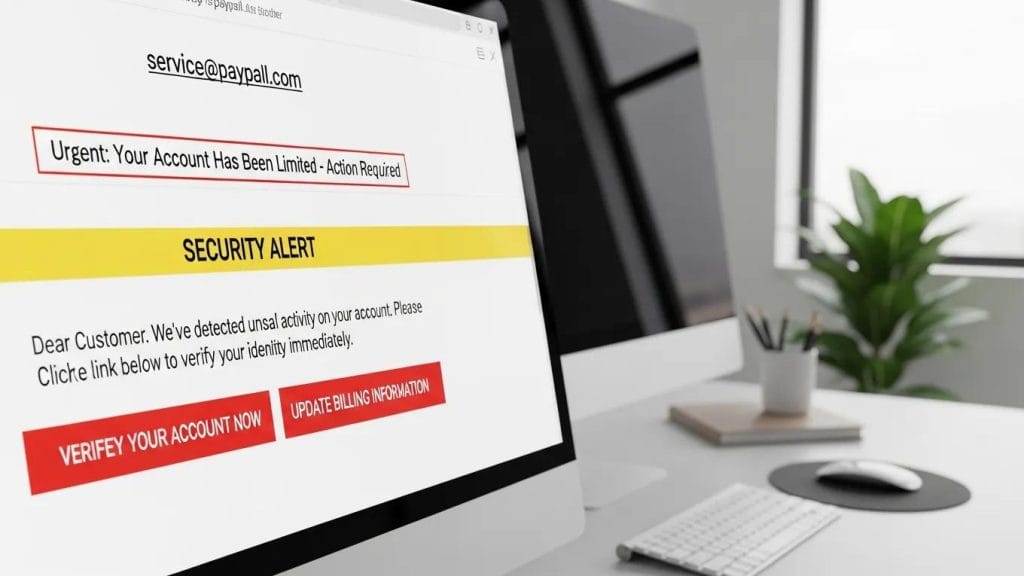
Key indicators to scrutinize include:
- Verify the Sender’s Address: Confirm that the sender’s domain precisely matches the legitimate organization’s domain. Sophisticated attackers often use look‑alike domains or subtle misspellings to deceive recipients.
- Beware of Urgent or Threatening Language: Messages that pressure for immediate action are designed to induce panic and bypass rational judgment—always pause and verify authenticity.
- Treat Unexpected Attachments or Links with Extreme Caution: Avoid opening files or clicking links that were not anticipated, as these may deploy malware or redirect to credential-harvesting websites.
Early detection of these signs significantly reduces the likelihood of compromise and provides critical time to implement containment measures.
What Should You Do Right After Clicking a Phishing Email?
If you have clicked a malicious link or opened a suspicious attachment, immediate and methodical action is essential to mitigate impact. Cybersecurity incident response protocols emphasize promptness and precision.
Step-by-Step Incident Response After a Phishing Click
Follow these expert-recommended steps without delay:
- Identify and Isolate the Threat: Immediately disconnect the affected device from all internet and corporate networks to prevent data exfiltration and lateral movement within the environment.
- Change Potentially Compromised Passwords: Securely update credentials for all potentially exposed accounts, including email, financial services, and corporate systems, using strong, unique passwords.
- Report the Incident to Security Authorities: Notify your organization’s IT security team, managed security service provider, or relevant cybersecurity authority to initiate a formal investigation and receive expert guidance on remediation.
Adhering to a structured incident response plan accelerates containment and recovery, minimizing operational disruption and data loss.
Cybersecurity Incident Response & Recovery Planning
This authoritative guide outlines comprehensive organizational strategies for managing cybersecurity incidents. It emphasizes the necessity of a detailed incident response plan encompassing detection, reporting, containment, root-cause analysis, and restoration of normal operations to ensure organizational resilience.
Cybersecurity Incident Management and Response Guide, 2024
Securing Accounts and Devices After a Phishing Click
Post-containment, it is critical to fortify accounts and devices to prevent secondary attacks and re-infection.
- Enable Multi-Factor Authentication (MFA): Implement MFA across all critical accounts to significantly reduce the risk posed by compromised credentials.
- Use Strong, Unique Passwords: Replace any exposed passwords with complex, unique passphrases and manage them securely using a reputable password manager.
- Monitor Account Activity Vigilantly: Continuously review account logs for unauthorized access attempts, unusual transactions, or configuration changes, and report anomalies immediately.
These advanced security measures are essential to restoring control and preventing recurrence.
How Clicking a Phishing Email Can Lead to Malware and Data Breaches
A single click can trigger the installation of sophisticated malware, compromise credentials, or establish a persistent foothold for attackers within your network. Understanding these attack vectors is fundamental to effective prevention and response.
Understanding Credential Theft and Business Email Compromise
Phishing campaigns frequently target login credentials to enable attackers to impersonate legitimate users, access sensitive systems, and execute Business Email Compromise (BEC) scams that result in financial fraud and data breaches.
BEC attacks are particularly insidious due to their reliance on advanced social engineering techniques designed to circumvent traditional security controls.
Understanding Business Email Compromise (BEC) Fraud
Business Email Compromise (BEC) represents a sophisticated and pervasive form of fraud targeting organizations and individuals to illicitly obtain financial assets and access to highly sensitive information. The evolving nature of social engineering tactics and attack vectors continues to challenge cybersecurity defenses globally.
Business email compromise: A systematic review of understanding, detection, and challenges, A Almutairi, 2025
Comprehensive knowledge of attack methodologies enables organizations to architect robust defenses and expedite recovery efforts.
What Are the Potential Business Impacts and Recovery Processes?
Phishing incidents can inflict substantial financial losses, operational downtime, and reputational damage. Effective recovery typically involves coordinated efforts among incident response teams, legal counsel, and communications with customers and regulatory bodies.
Associated costs may encompass forensic investigations, remediation activities, legal expenses, regulatory fines, and the significant investment required to restore stakeholder trust—underscoring the critical importance of proactive prevention and preparedness.
Effective Email Scam Protection Tips to Prevent Future Attacks
Mitigating phishing risks demands a multi-layered approach combining technical controls, comprehensive user training, and continuous vigilance. Implementing the following best practices enhances organizational resilience:
- Maintain Up-to-Date Devices and Software: Regularly apply security patches and conduct thorough vulnerability scans to eliminate exploitable weaknesses.
- Deliver Targeted, Realistic Security Training: Employ scenario-based exercises and up-to-date examples to empower employees to identify and respond to phishing attempts effectively.
- Deploy Advanced Email Filtering Solutions: Utilize sophisticated filtering and threat detection technologies to intercept malicious emails before they reach end users.
Integrating these strategies substantially reduces the likelihood of successful phishing attacks.
How Managed Cybersecurity Services Help Protect Against Phishing

Engaging managed cybersecurity service providers offers organizations continuous threat monitoring, expert incident response capabilities, and comprehensive employee training programs, enabling earlier threat detection and more efficient recovery.
- Phishing Simulations: Realistic simulated attacks train employees to identify and report suspicious messages in a controlled environment.
- Employee Education: Ongoing, adaptive training programs keep staff informed about emerging phishing tactics and evolving threat landscapes.
- Continuous Monitoring: 24/7 surveillance detects anomalous activities promptly, triggering rapid incident response protocols.
Partnering with a managed service provider enhances organizational defenses and alleviates internal resource constraints.
User Education and Best Practices for Email Threat Detection
Educating users to recognize and report phishing attempts remains one of the most cost-effective and impactful cybersecurity defenses. Effective programs are continuous, practical, and tailored to organizational needs.
Regular, adaptive training significantly improves employee resilience and reduces the success rate of phishing campaigns.
Employee Cybersecurity Training for Phishing Prevention
Phishing exploits human vulnerabilities within security frameworks, making employee awareness a critical frontline defense. Empirical research demonstrates that ongoing, adaptive training programs substantially enhance organizational resilience and diminish the effectiveness of phishing attacks.
THE IMPACT OF EMPLOYEES’
CYBER-AWARENESS TRAINING ON THE EFFECTIVENESS OF PHISHING ATTACKS, D Bogatinov, 2024
- Train Staff to Spot Phishing: Conduct regular, comprehensive sessions with clear, illustrative examples to improve recognition of common phishing tactics.
- Promote Safe Data Handling Practices: Encourage verification of data requests and enforce strict access controls based on the principle of least privilege.
- Facilitate Easy and Supportive Reporting: Establish a non-punitive, streamlined reporting process to ensure early detection and response to phishing incidents.
Fostering a security-conscious culture is instrumental in reducing risk and accelerating recovery.
For organizations seeking expert managed service provider options in Indiana, reputable vendors offer tailored cybersecurity solutions aligned with specific business requirements.
Many enterprises leverage cloud support services to enhance their security posture and operational resilience.
To comprehensively fortify your environment, consider the full spectrum of IT services designed to prevent, detect, and respond to phishing threats effectively.
Frequently Asked Questions
What are the long-term effects of falling victim to a phishing attack?
Long-term consequences may include substantial financial loss, identity theft, fraudulent account activity, and significant reputational damage. Recovery often necessitates credit monitoring services, legal assistance, and coordinated technical and communications efforts to restore security and trust.
How can I educate my employees about phishing threats effectively?
Implement a combination of regular, interactive training sessions, realistic phishing simulations, and clear, accessible reporting channels. Incorporate role-based scenarios and reinforce positive reporting behaviors to maximize engagement and effectiveness.
What role does technology play in preventing phishing attacks?
Technological defenses such as advanced email filtering, anti-phishing gateways, endpoint protection platforms, and multi-factor authentication substantially reduce phishing risks. Continuous monitoring and automated alerting systems further enhance detection and response capabilities.
Are there specific industries more vulnerable to phishing attacks?
Industries such as finance, healthcare, education, and any sector managing sensitive financial or personal data are disproportionately targeted. High transaction volumes and inadequate security controls increase their attractiveness to attackers.
What should I do if I suspect a phishing email but haven't clicked on it?
If you have not interacted with the suspicious email, avoid any engagement. Verify the sender’s authenticity, examine the message for spelling or domain anomalies, report the email to your IT department or email provider, and delete it securely after reporting.
How can I recover my accounts after a phishing attack?
Immediately change all affected passwords, enable multi-factor authentication, and review recent account activity for unauthorized actions. Notify financial institutions of any suspicious transactions, consider placing fraud alerts, and ensure IT performs thorough device scans and remediation before restoring full access.
Conclusion
Comprehensive understanding of phishing risks combined with a disciplined, timely response plan is essential for safeguarding personal and organizational assets. Prioritizing user education, implementing layered security defenses, and maintaining incident preparedness—or partnering with specialized managed security services—are proven strategies to reduce risk and accelerate recovery in the face of phishing threats.