HIPAA-Compliant IT Services for Indianapolis Area Healthcare Practices
Tech365 provides HIPAA-aligned managed IT services to healthcare organizations across Indianapolis, Carmel, Fishers, Noblesville, and Westfield. We handle the security controls so your team can focus on patient care.
LET'S CONNECT
Have a question or need help? Drop us a note below and we'll be in touch soon.
"*" indicates required fields
HIPAA COMPLIANCE CHALLENGES
Why Healthcare Practices Struggle With HIPAA Compliance
HIPAA compliance is more than a one-time checklist. Between evolving regulations, staff turnover, and the growing complexity of healthcare technology, most practices have gaps they don't even know about.
Risk Assessment & Documentation
Data Security & Encryption
Access Control & Authentication
Staff Training & Awareness
Business Associate Agreements
“⭐️⭐️⭐️⭐️⭐️ "Tech365 has made such a difference in a very short time with my medical practice. They improved the security of our records, suggested ways to make our technology more efficient, and always take the time to explain everything. I would highly recommend Tech365."
Jaime Miller
COMPLIANCE READINESS
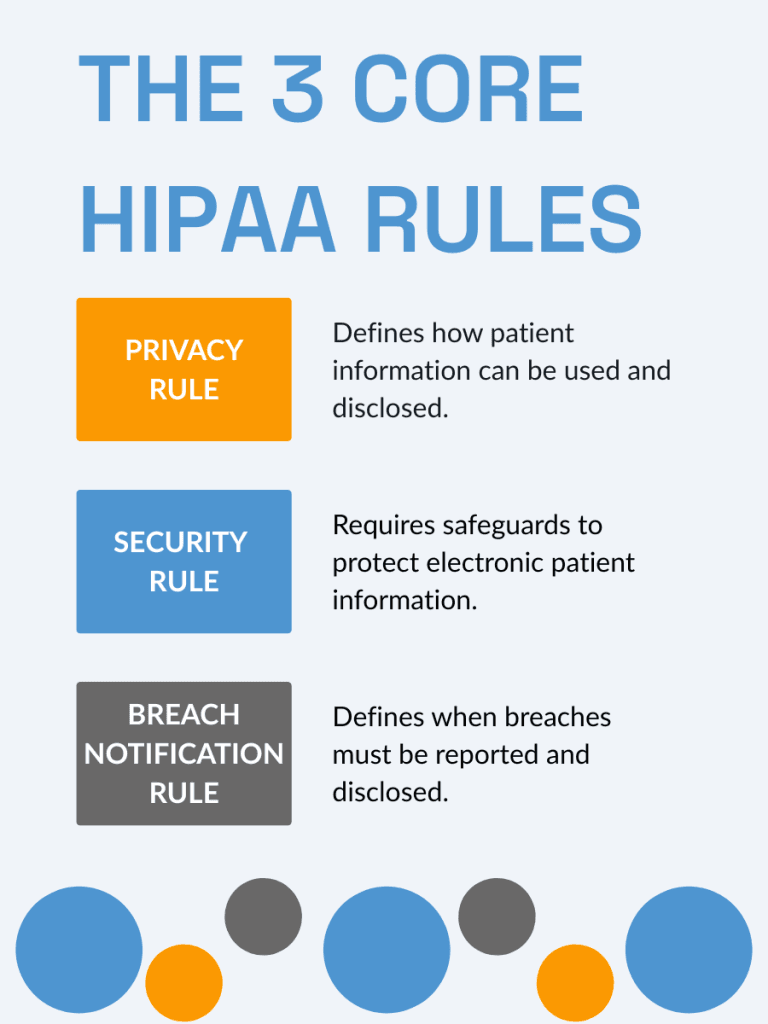
HIPAA Compliance Support Across All Three Rules
Tech365 implements and manages the security controls that address every requirement of HIPAA so your practice stays protected and audit-ready year-round.
Privacy Rule Compliance
We control who accesses patient data, enforce minimum necessary access policies, and maintain the documentation your practice needs to stay compliant.
Security Rule Compliance
We implement administrative, physical, and technical safeguards across every device, system, and connection at your practice.
Breach Notification Readiness
We monitor for unauthorized access, maintain documented incident response procedures, and support required notifications if an incident occurs.

HOW WE HELP
How Tech365 Handles HIPAA Compliance For Your Practice
Keeping patient data secure takes more than a single checklist. We put the right systems, policies, and protections in place so your practice stays compliant and your team stays focused on care.

IS YOUR PRACTICE ACTUALLY HIPAA COMPLIANT?
Most practices have gaps they don't know about until an audit or a breach. Let us take a look before that happens.
HIPAA RISK ASSESSMENT
What to Expect During Your Risk Consultation
During your HIPAA compliance consultation, we take a close look at how your practice handles patient data, where your systems may have gaps, and what needs to be in place to meet HIPAA requirements. You will leave with a clear picture of where you stand and what to do next.

Understand Your Current Setup
We start by reviewing how your systems are structured and how your team is using them day-to-day.

Review Security & Data Protection
We look at how your patient data is handled, where it’s stored, and how it’s being protected.

Evaluate Backup & Recovery Readiness
We assess whether your data can be restored and how your practice would respond if something went wrong.

Walk Through Findings & Next Steps
We explain what we see, answer your questions, and outline what may need attention moving forward.

WHY CHOOSE Tech365
Why Indiana Practices Trust Tech365 for HIPAA Compliance
HIPAA compliance is not a one-time checklist. It is an ongoing process that requires the right systems, the right policies, and a team that understands what is at stake. Here is why medical and dental practices across Indiana trust Tech365 to keep them covered.
We Know Healthcare IT
We work with medical and dental practices every day. We understand the systems you use, the regulations you answer to, and the pressures your staff is under.
We Make Compliance Simple
We handle the technical side so your team does not have to. No confusing jargon, no overwhelming reports, just clear steps and systems that work.
We Are Local and Available
We are based in Indiana and support practices across Indianapolis, Noblesville, Carmel, Fishers, and Hamilton County. When something comes up, you reach a real person who knows your setup.
We Stay Ahead of Changes
HIPAA requirements evolve and so do the threats to patient data. We monitor changes and keep your practice up to date so you are never caught off guard.
We Put a BAA in Place Before We Touch Anything
Every engagement starts with a signed Business Associate Agreement. Your patients' data is protected from day one.
INDUSTRIES WE SERVE
HIPAA Compliance Support for Indiana Healthcare Practices
Every type of practice handles patient data differently. We work with a range of healthcare and wellness organizations across Indiana to make sure the right protections are in place for the way your practice actually operates.

Dental Offices

Chiropractic Offices

Physical Therapy Clinics
Urgent Care Clinics
Pediatric Practices
Medical Offices

Laboratory Services

Mental Health Practices
Local HIPAA Compliance Across Central Indiana