Unifi Point to Point | Certified Ubiquiti Installer
Connect Your Buildings Wirelessly. No Trenching Required.
A warehouse across the lot, a shop out back, or a second office down the road. UniFi Building Bridges link them to your main network at multi-gigabit speeds, installed and aligned by Tech365's own team.
Main building
Warehouse
Up to 1,640 ft between buildings
Multi-gig linkSame network, no digging
Distance Planner
How Far Apart Are Your Buildings?
Slide to the distance between your buildings and see how we'd connect them.
Main building
Other building
Within range of a UniFi Building Bridge
Building Bridges are rated for up to 1,640 ft, with the XG model reaching up to 6 Gbps.
Assumes clear line of sight between the buildings. Ubiquiti rates UniFi Building Bridges for links up to 500 m (1,640 ft). We confirm every link during a site check.
Built for Indiana Weather
What Happens When It Storms?
Building Bridges use a fast 60 GHz main link and a 5 GHz backup radio. Flip the weather and watch what happens.
Main 60 GHz link active
Link statusConnected
Active radio60 GHz main link
SpeedMulti-gigabit
On a clear day, the 60 GHz main link carries traffic at full multi-gigabit speed.
What You Can Connect
One Network, Every Building
Tap a building to see what a point-to-point link brings to it.
Main building
Connected building
Same WiFiSame camera systemSame door accessManaged in one app
Skip the Shovels
Trenching Cable vs. a Wireless Bridge
Running cable between buildings usually means digging. A wireless bridge goes over the top instead. Watch the difference.
Trenching new cableMore digging, more disruption
Permits and utility locatesDig the trenchLay conduit and cableRepair pavement and landscapingFinally connected
UniFi Building BridgeLittle to no disruption
Mount two radiosAlign the linkConnected
When fiber still wins: if there's no clear line of sight, or a link needs to be wired for other reasons, trenching may still be the right call. We'll tell you honestly which option fits your site.
Bridge Lineup
The Right Link for the Distance
Most building-to-building links use one of two UniFi Building Bridges. For longer distances, we design around other Ubiquiti radios.
Everyday links
UniFi Building Bridge
A reliable gigabit-plus link for warehouses, shops, and nearby buildings.
RangeUp to 1,640 ft
Speed1.7+ Gbps
60 GHz main link5 GHz backupManaged in UniFi
Maximum speed
UniFi Building Bridge XG
Multi-gigabit performance for busy buildings, camera-heavy sites, and server links.
RangeUp to 1,640 ft
SpeedUp to 6 Gbps
10G fiber-ready uplink5 GHz backupWeatherproof
Longer distances
Long-Range Links
For buildings farther apart than a Building Bridge reaches, we design the link with higher-range Ubiquiti radios matched to your exact distance and sightline.
Designed per siteLine-of-sight survey
Range and speed are Ubiquiti's published figures. Real-world performance depends on distance, sightline, and weather.
Our Own Team
The People on Your Roof Work for Tech365
No subcontracted crews. Our own technicians survey, mount, and align every link, and the same local team supports it afterward.
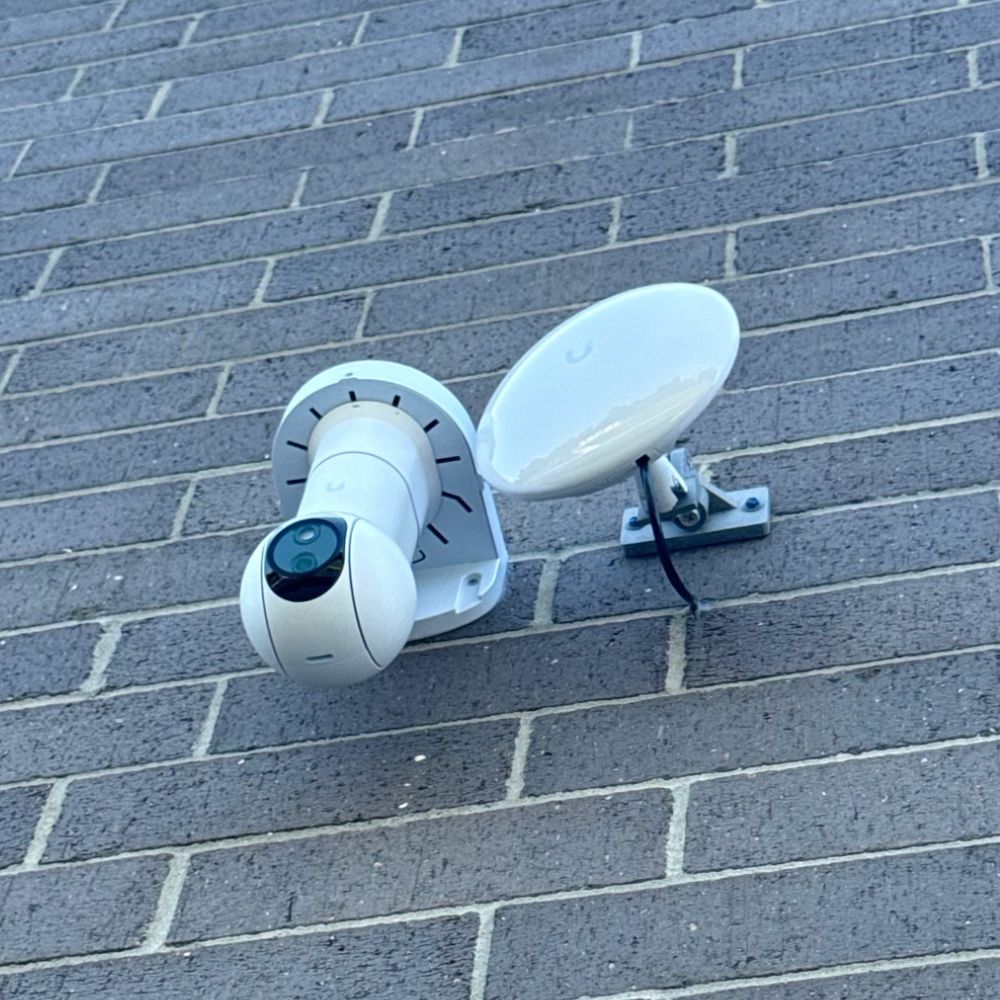
- Our own techniciansEvery survey, mount, and alignment is done by Tech365 employees, never a subcontracted crew.
- One team for every layerThe same team that installs your bridge also manages your network, WiFi, and cameras, so nothing falls between vendors.
- Supported locallyIf the link ever needs attention, you call the same Central Indiana team that put it up.
Every Link Includes
Surveyed, Mounted, & Aligned by Our Team Aligned by Our Team
Every point-to-point project includes the same complete scope, handled entirely by Tech365's own technicians.
1
Line-of-sight check
We confirm a clear path between buildings, watching for trees, rooflines, and future obstructions.
2
Secure mounting
Radios mounted on walls or poles, sealed and secured for year-round weather.
3
Precision alignment
Both radios aligned for the strongest, most stable link.
4
Network integration
The new building joins your existing UniFi network and console.
5
Link testing
We verify speed and stability before we call it done.
6
Documentation
Mounting locations, settings, and link details recorded for the future.
TRUSTED BY LOCAL BUSINESSES
Linking Buildings, Earning Trust
From warehouses to second offices, local businesses trust Tech365 to keep every building connected. Here’s what they have to say.
EXCELLENT Based on 132 reviews
 Posted on Google

 Ashley MohrNovember 7, 2026We can’t say enough great things about this crew! Wednesday turned into a bit of crisis mode when our office server unexpectedly went down. Thankfully, he had a replacement server on hand, got everything set up, and even drove it to us to get us back up and running! They are always responsive, knowledgeable, and willing to go above and beyond. One of the things we appreciate most is how they make IT feel easy, even when we’re asking questions that probably seem silly to them! They never make us feel that way and are always patient and helpful. So thankful to have a team we can count on, especially when things don’t go as planned. Highly recommend!Posted on Google
 Clay ClementNovember 7, 2026Since we built this home 10 years ago, we’ve struggled with decent WiFi in several locations. Brandon came out today and within about an hour, installed some additional equipment and we are now well connected everyone in our home. Thanks Brandon for solving this for us quickly and efficiently.Posted on Google
 Luke RogersNovember 5, 2026Our dental office has been using Brandon and Tech365 for the last several years and cannot recommend their services enough. Some of the nicest people you will ever meet and have never had a single issue that the team couldn’t get resolved quickly. 10/10 couldn’t recommend more!Posted on Google
 Natalie LorenzanoNovember 5, 2026We use Tech365 for any and all IT related issues. They are speedy and knowledgeable and have helped our business grow! They are so friendly and really care about our issues.Posted on Google
 Patti HarmlessNovember 4, 2026Brandon is a lifesaver, especially for someone who is technically challenged. He answers my questions in a way I can understand and his patience is exceptional. Brandon and Tech365 are extremely generous with their support and the PCYDC CASA Program appreciates their service. Patti Harmless PCYDC CASA DirectorPosted on Google
 Joe MetzSeptember 1, 2026Brandon was a huge help! I was referred to 2 other tech people first (from other companies) who were not able to solve my issue and Brandon had us up and running in just a few hours. I could not recommend Brandon and Tech365 enough!!Posted on Google
 Missy TennantAugust 25, 2026Brandon and his team are the best. They are always available and keep us up and running. We couldn't do what we do without him.Posted on Google
 Zach SmithAugust 24, 2026We have been absolutely thrilled with the team at Tech365. They are very quick to respond when they are and go above and beyond to service their clients. We are happy to have them on our side!Posted on Google
 Monish PatelAugust 24, 2026Best Ever. Brandon knows it all and does the best work!! Would use him for everything! Smartest guy in the room and has the best heart as well!!Posted on Google
 Joshua CarterAugust 23, 2026If you are looking for a company that prioritizes your needs, finds ways to save you money, and can do anything (literally anything) tech related…. Look no further. I have been working with Tech365 for the past couple of years and my business operations have drastically improved because of them. Brandon solves problems and lets you be a part of the process and learn along the way. Super helpful for another business owner who desires to understand all parts of their business. I highly recommend Tech365!
QUESTIONS WE HEAR OFTEN
Point-to-Point FAQ
Straight answers about distance, weather, and who's doing the work.
Do you use subcontractors for point-to-point installs?
No. Every Tech365 link is surveyed, mounted, aligned, and configured by our own employees, and the same team supports it afterward.
Do the buildings need a clear line of sight?
Yes. The radios need a clear path between them. Trees, rooflines, and other buildings can block the link, so we check the sightline during a site visit and plan mounting heights around it.
What happens in rain or snow?
UniFi Building Bridges have a 60 GHz main link and a 5 GHz backup radio. Very heavy rain can weaken the 60 GHz signal, and when it does, the bridge switches to its backup automatically and switches back afterward.
How far apart can the buildings be?
UniFi Building Bridges are rated for links up to 1,640 ft (500 m). For longer distances, we design the link with higher-range Ubiquiti radios.
How fast is the connection?
The UniFi Building Bridge delivers 1.7+ Gbps, and the Building Bridge XG reaches up to 6 Gbps. Real-world speed depends on distance and conditions.
Is the wireless link secure?
Yes. The link between the two radios is encrypted, and the bridge is managed alongside the rest of your network in UniFi.
Are there licensing or monthly fees?
There are no license fees for the link itself. The bridges run on bands that don't require an FCC license, and they're managed in your UniFi system at no extra cost.
Can the new building have cameras, WiFi, and door access?
Yes. Once connected, the other building is part of your main network, so it can run the same UniFi WiFi, cameras, and door access.
Ready to Connect Every Building?
Book a complimentary site check. We'll confirm the sightline, measure the distance, and show you exactly how we'd link your buildings.
UniFi Point to Point Installation Across Central Indiana